
How to do a stock adjustment
1. Go to inventory
2. Stock adjustments
3. Click on your warehouse and stock item.
4. Double click on the item.
5. In the pop-up window make sure to complete everything and use a proper description
6. Important - qty - in the example below there is 143 in stock. The qty you enter on your adjustment is what the NEW qty is after the adjustment. NOT how much you want to adjustment. So in this case I want to down adjust the stock with 3 qty. So I enter my new qty whick is 140.
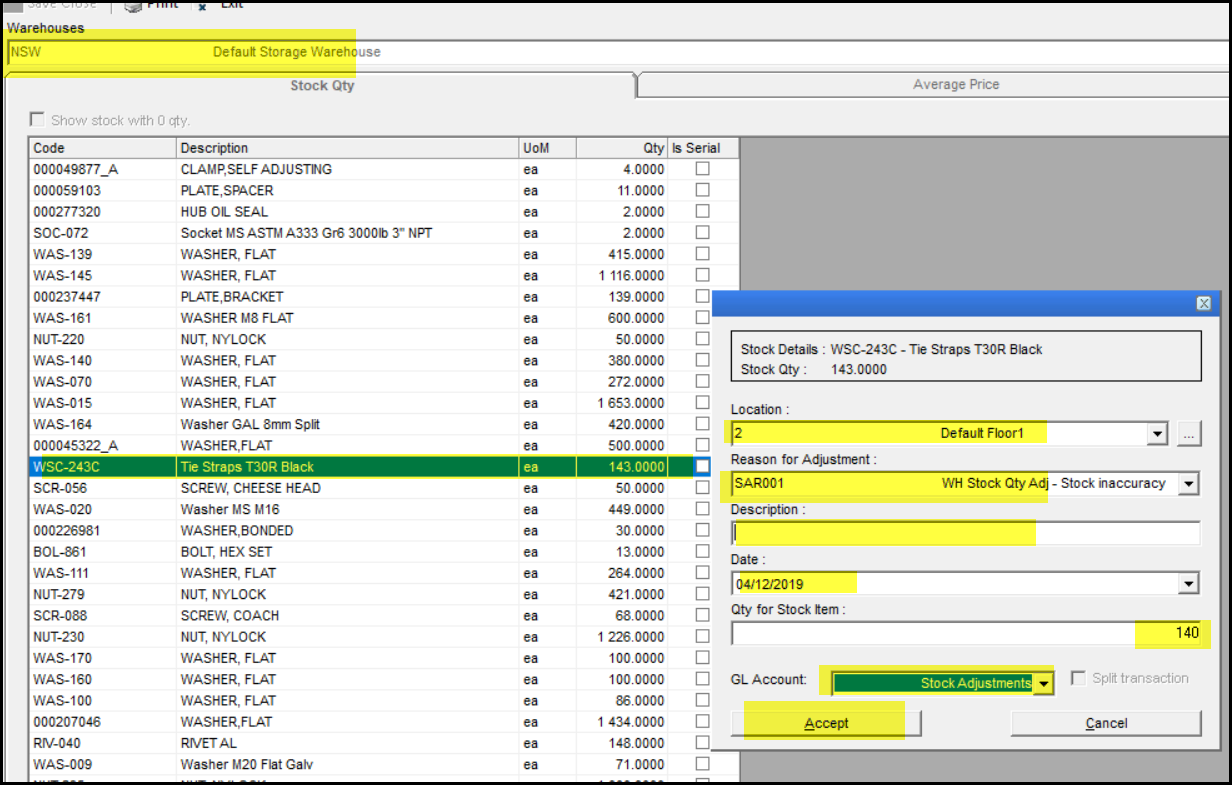
7. The GL account is also important - normally STA-100 Stock Adjustments
8. Click on accept.
9. Also good to do a stock enquiry afterwards to make sure that your stock adjustment was done correctly. How to do a stock enquiry
Created with the Personal Edition of HelpNDoc: Full-featured Documentation generator