How to search on supplier stock code
1. If you have the supplier stock code you can search accordingly.
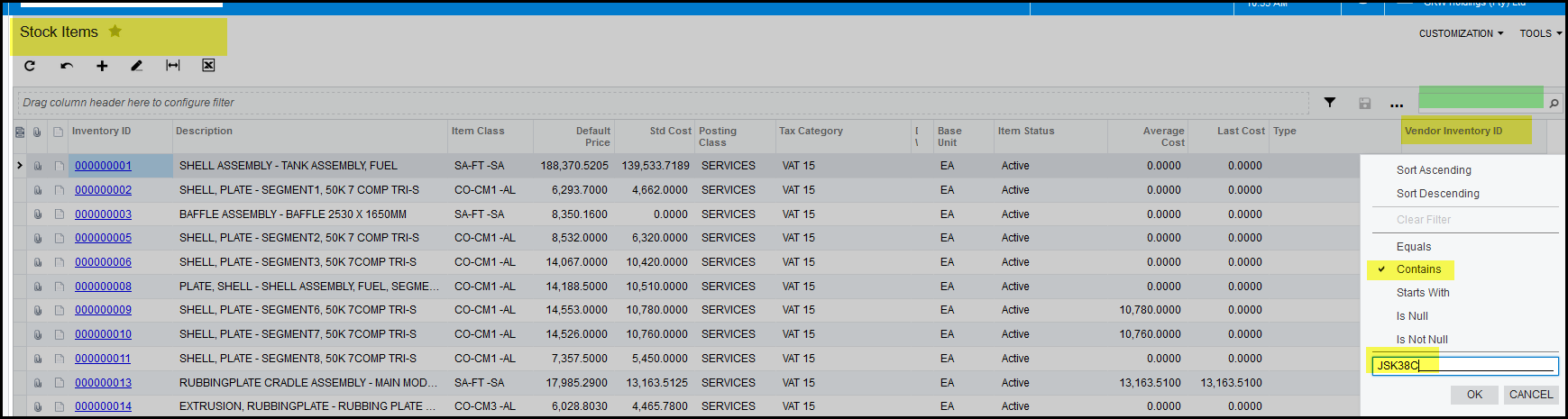
2. Most of you uses the normal search - see green section to your right.
3. A quicker search is to double click on the inventory column, tick contains, type a part of the code and click on OK.
4. The search will bring up your item.
5. The search will only show the default preferred supplier's code.
6. To add a preferred supplier click here: How to add preferred supplier code
7. If you do not have the supplier code you can look it up by searching on 'Inventory ID' column with the GRW stock code.

Created with the Personal Edition of HelpNDoc: Experience the Power and Ease of Use of HelpNDoc for CHM Help File Generation