How to add preferred supplier code
1. Search your specific stock item.
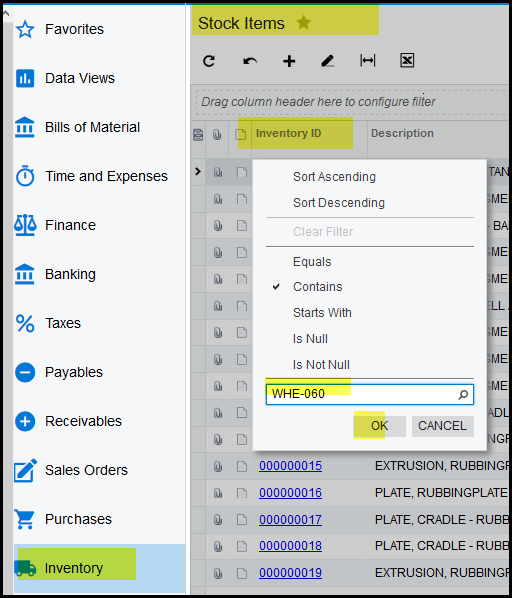
2. Most of you uses the normal search, a quicker search is to double click on the inventory column, tick 'contains', type a part of the code and click on OK.
3. The search will bring up your item, click on your item to open it.
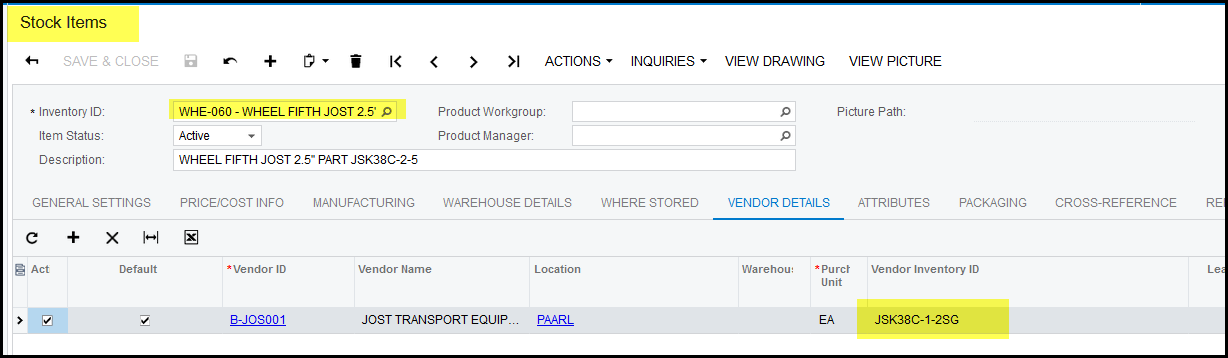
4. Go to 'VENDOR DETAILS'
5. If no supplier shows here, click on the '+'
6. Add you supplier and make it active.
7. Add the supplier code in the section 'Vendor Inventory ID' and SAVE.
8. If this is the default supplier then tick the 'default' box. This suppliers code will also show on the search on the general stock enquiry.
9. You can add as many suppliers as you want, but only one can be a default supplier.
Created with the Personal Edition of HelpNDoc: Maximize Your Productivity with HelpNDoc's Efficient User Interface