Publishing to IIS
Deploying GRWERP web application to IIS
- Before publishing site make sure to increase the "APIVersion" & "SiteVersion" located in the appsettings.json file.
- See documentation regarding source control using GIT
IIS Publishing Profiles
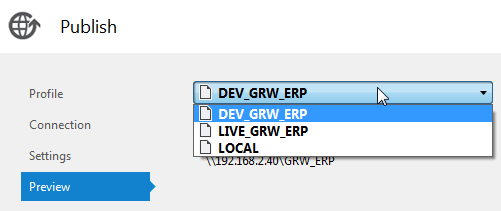
There are three publishing profiles to chose from when publishing from Visual Studio.
- DEV_GRW_ERP - Development Server : GRWIIS7 (http://grwiis7:82)
- LIVE_GRW_ERP - Live Server : GRWERP (https://erp.grw.co.za)
- LOCAL - Local File system
DEV_GRW_ERP :
Used for testing new functionality and serves as a staging area before publishing live.
LIVE_GRW_ERP :
Production server used by grw employees.
LOCAL :
Used for testing build outputs on development machine.
Server preparation before publishing
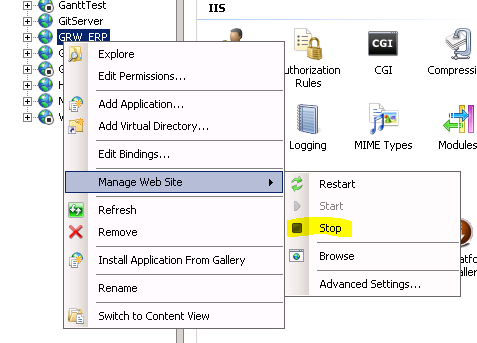
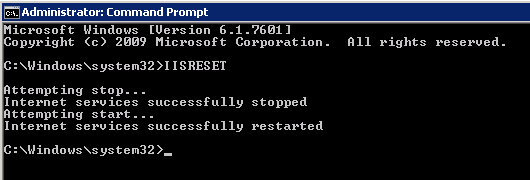
Before publishing, the web site instance needs to be stopped in IIS and the "IISRESET" command needs to be ran from command-line in administrator mode. This need to be performed for both the DEV_GRW_ERP and LIVE_GRW_ERP publishing profiles.
Publishing from Visual Studio
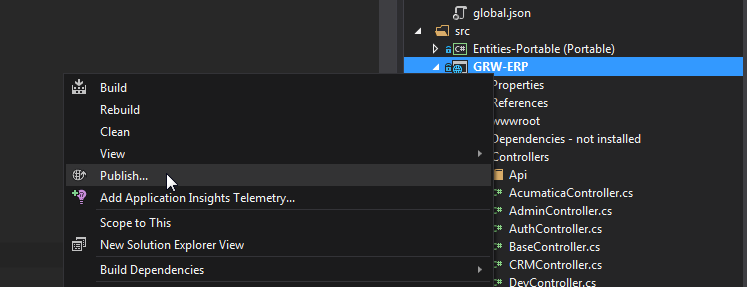
To publish using visual studio. Right click the project in the solution explorer and select "Publish" then select the profile and click publish.
After publishing
Visual studio will indicate when the publish process is complete and the IIS instance can be started again.
The site will be ready for access when the instance started up.
Created with the Personal Edition of HelpNDoc: Free PDF documentation generator