GIT Syncronization
GRW ERP source code check in to a GIT repository.
- Make sure to install the latest GIT client : https://git-scm.com/downloads
- GRW repositories are hosted on : http://grwiis7:85/
Retrieving source code (first time)
From command line type : git clone http://grwiis7:85/GRW_ERP.git
Check in methods
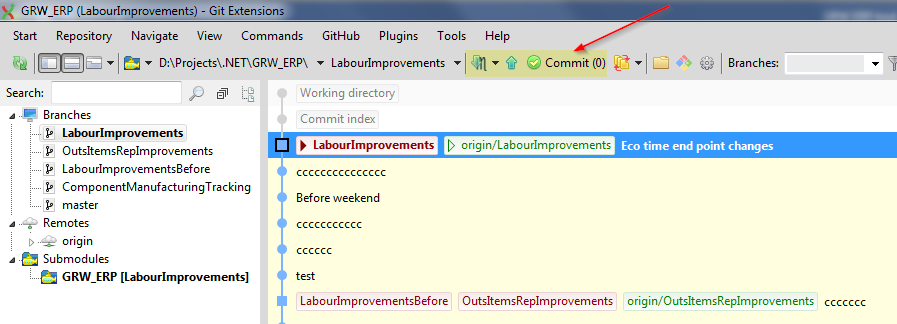
GIT Extensions : (https://sourceforge.net/projects/gitextensions/)
Open cloned directory using git extension.
Use action buttons indicated below to pull/push/commit code :
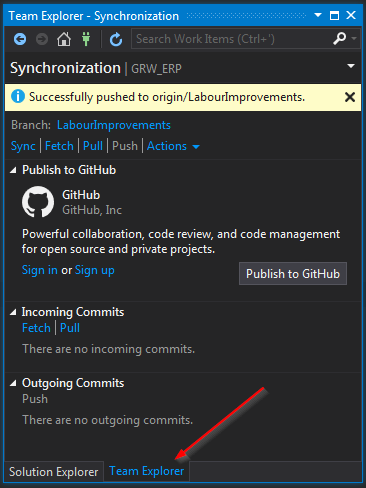
Visual Studio :
Open cloned directory using team explorer :
Command line :
|
Initializes git folder |
git init |
|
|
Create a working copy of a local repository: |
git clone /path/to/repository |
|
|
For a remote server, use: |
git clone username@host:/path/to/repository |
|
|
Add one or more files to staging (index): |
git add <filename> |
|
|
Commit changes to head (but not yet to the remote repository): |
git commit -m "Commit message" |
|
|
Commit any files you've added with git add, and also commit any files you've changed since then: |
git commit -a |
|
|
Send changes to the master branch of your remote repository: |
git push origin master |
Sources : (https://confluence.atlassian.com/bitbucketserver/basic-git-commands-776639767.html)
Created with the Personal Edition of HelpNDoc: Make Your PDFs More Secure with Encryption and Password Protection