How to do a stock adjustment of a serialised item
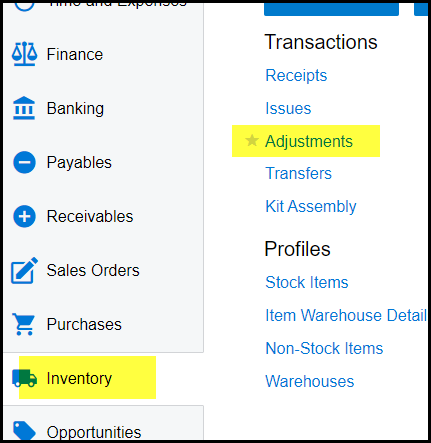
1. Go to Inventory>Adjustments
2. Click on the '+' to add a new stock adjustment
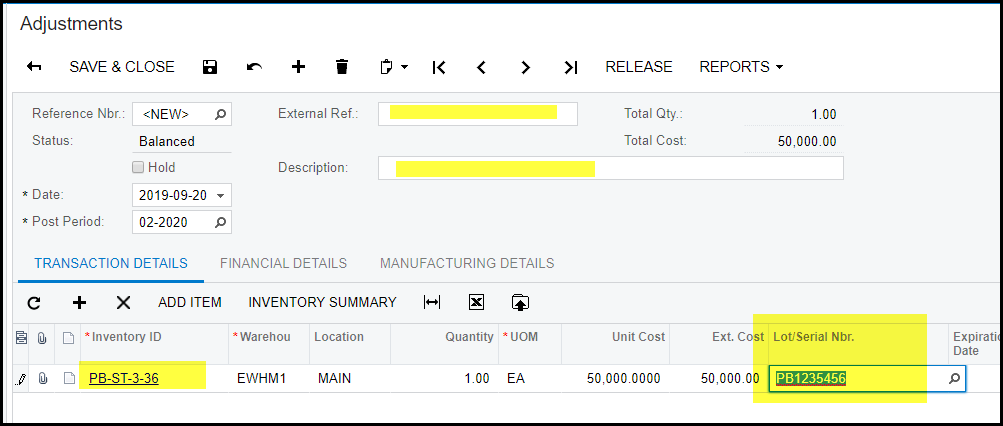
3. If you want to do a adjustment against serialised items you have to select the serial number or if these is no stock on hand, you have to type in the serial number because this is the first time the system knows about this serialised item.
4. In the external Ref and description type in a proper description.
5. Add inventory ID in the transaction details. Type in the Lot/Serial Nbr for your item.
6. Save take of hold and release.
Created with the Personal Edition of HelpNDoc: Maximize Your Documentation Output with HelpNDoc's Advanced Project Analyzer