How to create a warranty job
1. Go to Production Maintenance, click on the + to add new job.
2. Production order type is RO.
3. Use the next number, numbering started with WAR0001.
4. Inventory code is WAR-500.
5. The warehouse and location will default automatically.
5. Start your description with 'WARRANTY JOB' followed by job no applicable to this warranty. Example 'WARRANTY JOB TS0037'.
6. Save.
7. Your job status is planned.
8. Click on Inquiries at the top menus and production detail.
9. Add a new operation, see below.
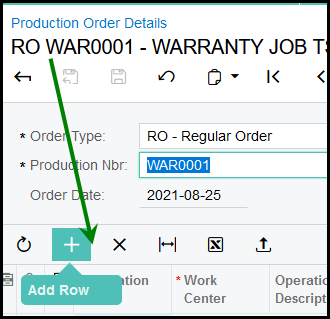
Your operation ID will always be 0010 and use AB10, type in your job description as operation description. Run unit should be 1 and the rest leave as it is.
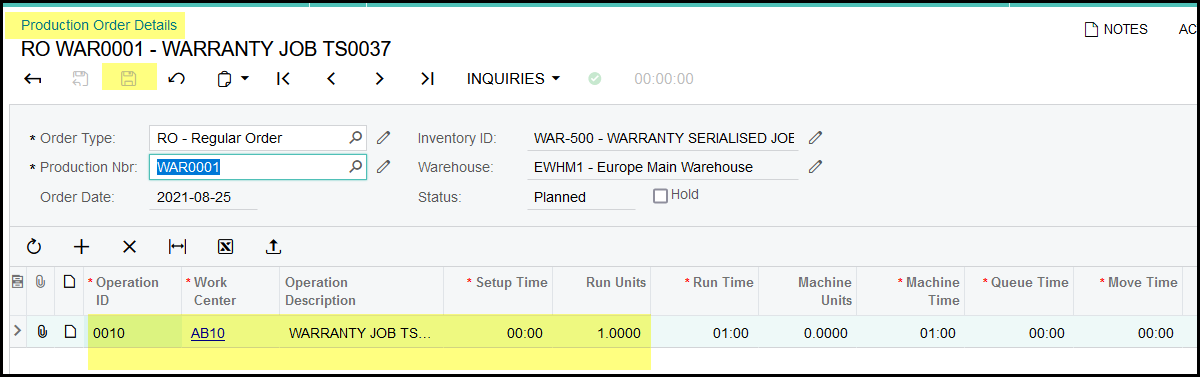
10. To add stock stand on the operation line and click on the + to load stock to the job. Follow the columns and complete.
11. Before you release your job go production maintenance, references and set the WIP Variance Account to - WAR-10000. Save. This will ensure that when the job is closed all the cost with write to warranty expense.
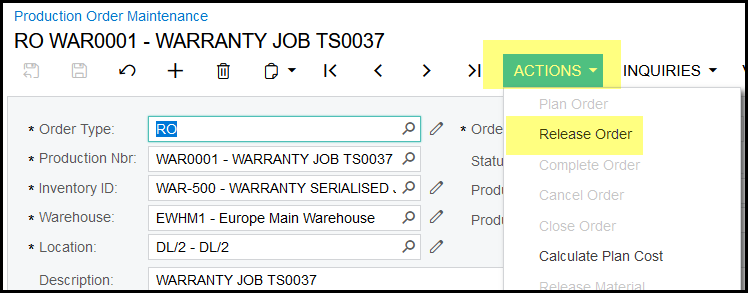
12. Once done you can release your job. Go to production maintenance and click on actions>release order.
Created with the Personal Edition of HelpNDoc: Revolutionize Your Documentation Output with HelpNDoc's Stunning User Interface