EU - Rules for requisition approval
. Approval rules is applied to the total amount of a requisition - Est. Ext. Cost. See below.
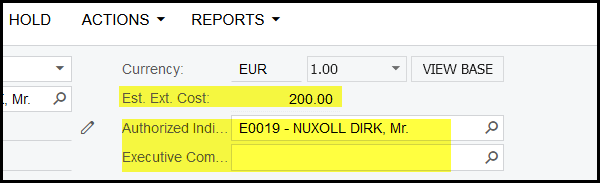
2. If your total amount of your requisition is less than or equal to €1 000.00 you only have to select one person from the
list of 'Authorized Individuals'.
3. If your total amount of your requisition is greater than €1 000.00, but less than or equal to €5 000.00 any two authorised persons can approve.
Select one person from the list of 'Authorized Individuals' AND one person from the list of the 'Executive Committee'
4. If your total amount of your requisition is greater than €5 000.00, you have to select one person from the list of
'Authorized Individuals' AND one person from the list of 'Executive Committee'
(your list of the executive Committee will only contain executive members)
5. For all capex requisitions the same rules as nr. 4 apply, but your Finance Executive(Gillaume Hager) also needs to do a final approval -
you do not have to select the finance executive - Acumatica will automatically send a request to him once your two selected approvers
have approved.
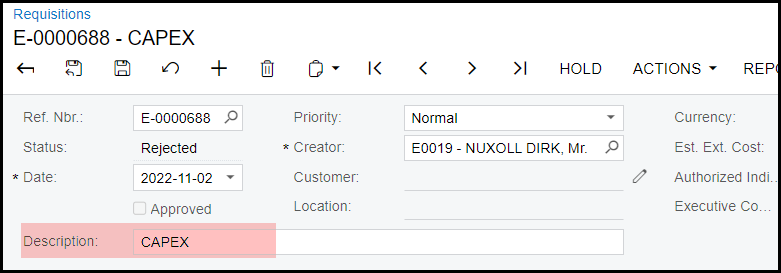
6. Please note for a capex requisition only the 'words' CAPEX (can be lower or upper case) should appear in the description line of
header of the requisition. See below.
5. When you save your requisition Acumatica will check the rules for approval and will give you an error and indicate what you need to correct.
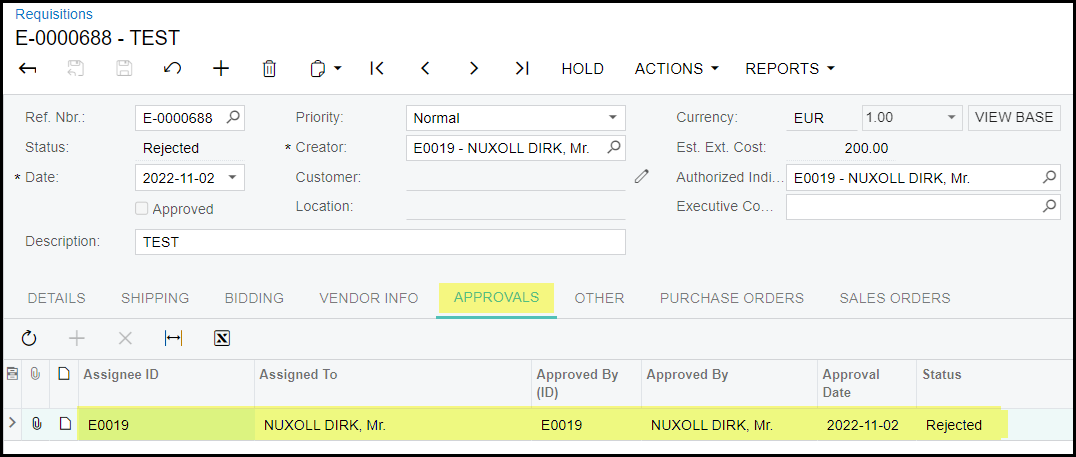
6. If you are waiting on approval, you can go to the approval tab to see details on the outstanding approvals.
Created with the Personal Edition of HelpNDoc: iPhone web sites made easy