How to do a non-stock PO (only for contracts approved)
1. All non-stock should start from a requisition that was approved. Only when there is a standard contract like 'cleaning contract'
that was approved by the Chief Financial Officer the process can start from a PO.
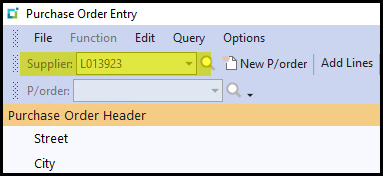
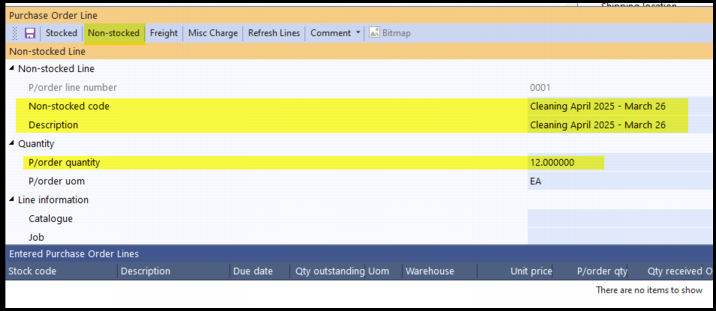
2. Select your supplier > click on Non-stocked - complete your description in the 'non-stocked code field' and copy to 'Description'.
Add your 'Qty'. In this example my qty is 12 because it is a 12month contract. I only create one PO and will GRN 1 qty each month.
You can also have 12 lines on the PO indicating in the description each month.
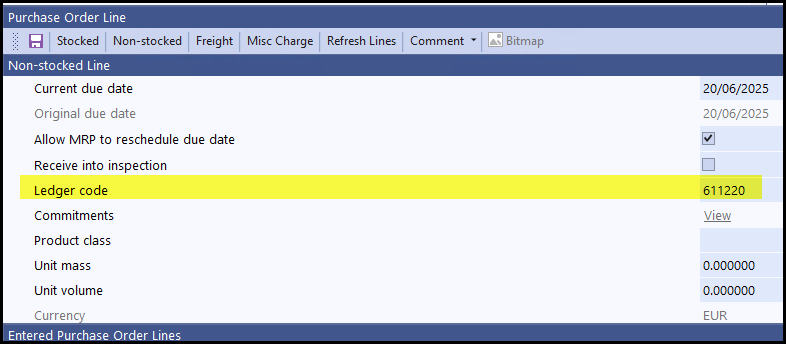
3. Important is the general ledger code you select. This is to which account the expense writes. If you do not know the account click on the selector
to search or ask your financial team.
Created with the Personal Edition of HelpNDoc: Effortlessly upgrade your WinHelp HLP help files to CHM with HelpNDoc