How to cancel a requisition
1. Go to the requisition entry screen to cancel a requisition.
Only the originator will be able to cancel a requisition.
This means if you are the holder of the requisition you will not be able to cancel it.
Route the requisition back to the originator to cancel it.
The requistion can only be cancelled by the originator.
The originator should be the holder as well.
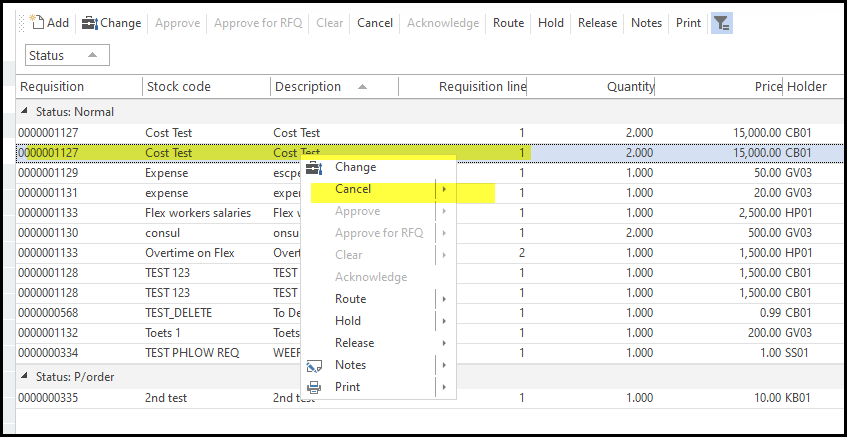
2. To cancel a requisition. Stand on the requisition, click on the cancel button on the top.
If it is greyed out it means you cannot cancel is, then you probably have to route it to the originator.
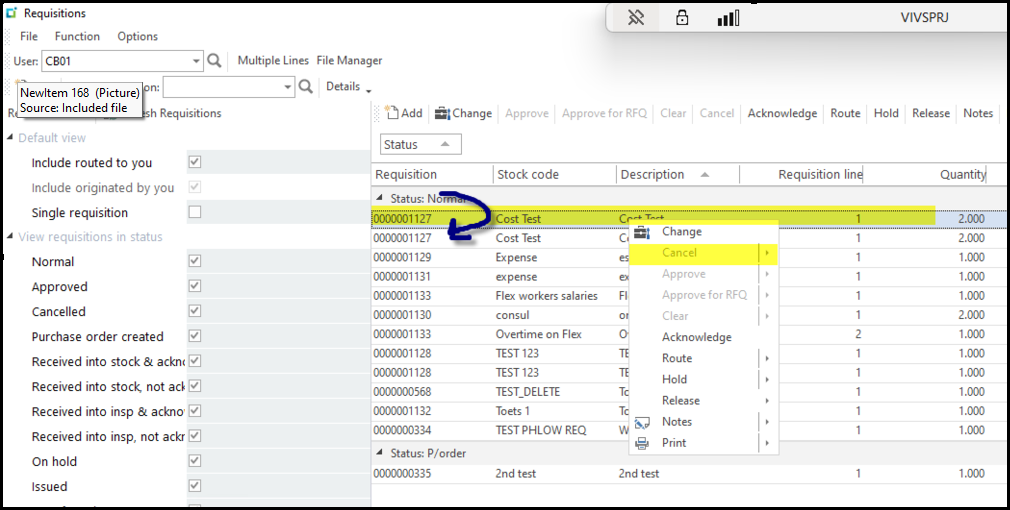
3. On the requisition entry screen you requisition can show mulitiple times. Click on the last line to cancel it.
See below the yellow highlight line does not allow you to cancel. Move to the next line.
4. Below you will see on the next line you are able to 'cancel'
Created with the Personal Edition of HelpNDoc: Easily create iPhone documentation