Rules on creating intercompany purchase orders
1. Only used to purchase from GRW Engineering Worcester - B-GRW001
2. Keep your purchase order 'on hold', to make sure about your prices and qty.
3. When you un tick 'on hold', SAVE and refresh(Ctrl+F5) an interco job nr will appear.
Please be patient with this - it can take a while if your order has lots of parts.
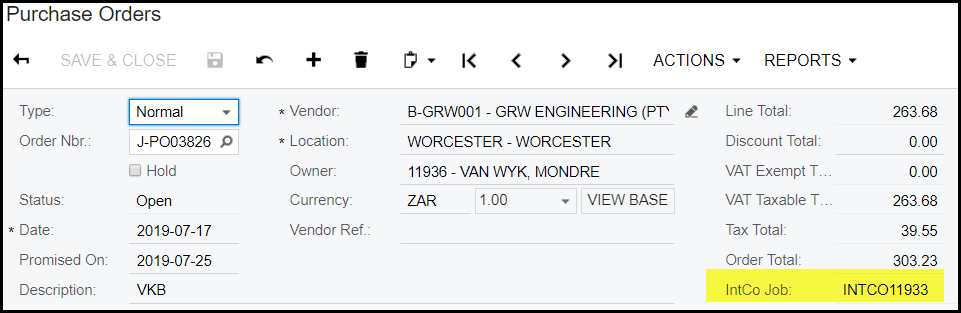
4. Only when an interco job shows GRW Engineering Worcester will know about this PO. and your parts will be manufactured and shipped.
5. Once your PO shows an interco job - you cannot change anything on the PO or cancel the PO.
6. Contact GRW supply team for assistance when your order needs to be canceled or amended, this is manual process and can only be done in extreme cases and approved by GRW supply team (Rean Engelbrecht).
7. If your purchase order has parts on that does not exist in GRW wisERP Worcester database it will not create an interco job nr and therefor nobody at the Worcester branch will react to your purchase order request.
9. No modules can be ordered - contact Engineering(Johannes Jonker - JHB Branch/Cayley Davids - Worc Branch) to do admendments in Windchill and create new sub-assembly.
10. No sub-assemblies that is phantoms in the GRW wisERP Worcester database can be ordered - you have to order the parts loaded under the sub-assembly.
11. If you need to receive a phantom sub-assembly as a complete unit then you have to contact Engineering(Johannes Jonker - JHB Branch/Cayley Davids - Worc Branch) to do admendments in Windchill and create new sub-assembly.
Created with the Personal Edition of HelpNDoc: Maximize Your CHM Help File Capabilities with HelpNDoc