Parameters for Non Inventory Items
Parameters for Non Inventory items
Non-inventory items are used in 3 scenarios:
- For expenses where the NI item is linked to a specific expense GL account that will allow a user to place an expense requisition against the NI item. Upon approval a purchase order will be generated and upon receipt a linked expense account will be debited in the GL. It is important to note that NI items can only use standard cost as a cost/valuation method. With this in mind, NI items should only be used where the cost is well known. Alternatively, the cost must be set up as R1 per unit and the required cost manipulated by changing the qty. Avoid this application as far as possible.
- For services (production operations) that are outsourced such as galvanizing or electro polishing and required on a BOM of a component or sub assembly. The cost of the service must be known and a specific part no related code is required for the outsourced service.
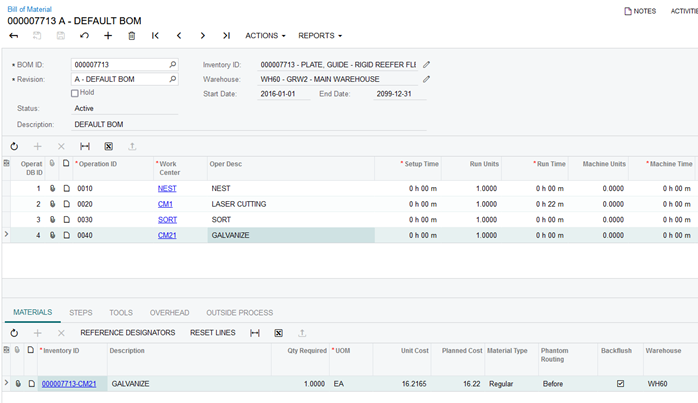
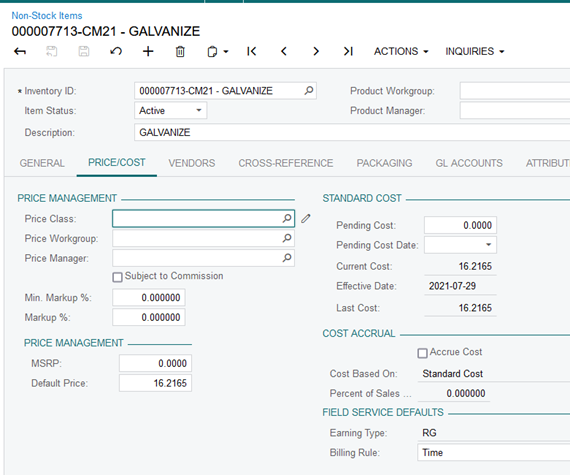
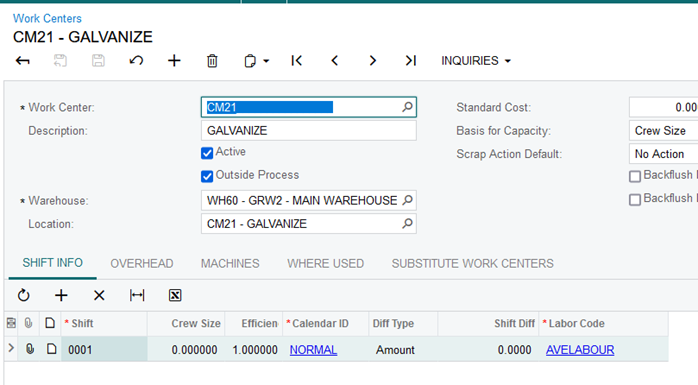
Refer to screen shot 1: Part No 000007713 requires four operations in its manufacturing process. The galvanize operation is outsourced. The work center CM21 must be marked as an outside process. See screen shot 3. In order to raise a purchase order for the outside process a NI code is required that is set up with the cost of the outside process. The NI code convention for such services is a concatenation of the part no and the work center (000007713-CM21). See screen shot 2
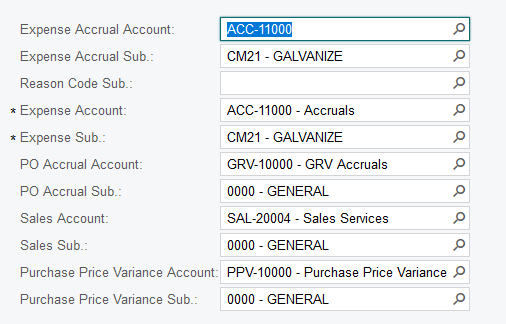
A customization of the purchase order process allows the user to group parts containing the same outside process on one purchase order. It is important to mark the NI item for back flushing on the material line in the BOM. The receipt will credit GRV accruals and debit the expense account. The receipt transaction calls the move transaction that debits WIP and credit the expense accrual account. See below. It is important that the expense accrual account and expense account including sub accounts are the same account. See screen shot 4
- The third scenario is where a NI item is required on a wisERP job. In wisERP this NI item must exist as an operation with the same code. There are two types of operations:
- Operations ordered from suppliers.
- Here it is important that the operation set up in Acumatica is a NI item with a standard cost per unit and with the ‘Dflt Mark For’ set to ‘Purchase’. See screen shot 5.
- When issuing such a NI item in wisERP from the issue and return operations menu, the NI item line is added to the production order and marked for PO.
- From the Create Purchase Orders menu in Acumatica, this production order line is selected to generate the PO.
- Upon receipt of the NI item, a material transaction follows automatically that issues the NI item to the linked production order line.
- In-house operation
- The operations used in wisERP such as labour and warranty provision
- They must exist in Acumatica as NI items with the ‘Dflt Mark For’ set to ‘No default’
- When issuing an operation in wisERP a material transaction is performed on the corresponding NI and production order in Acumatica
Screen shot 1:
Screen shot 2:
Screen shot 3:
Screen shot 4:
Created with the Personal Edition of HelpNDoc: Free iPhone documentation generator