How to create a new business account as a prospect and convert to customer or vendor
1. A business account can be created as different types:
A - Prospect (not yet a customer or vendor)
B - Customer
C - Vendor
D - Customer and Vendor
Important Notes:
Prospect - you can create an opportunity from a prospect
- you cannot create a sales order from a prospect
- you can create a purchase requisition from a prospect
- you cannot create a purchase order from a prospect
2. The above rules imply that a prospect need to be changed to a customer or vendor before a purchase order or sales order can be opened.
3. Only specified people will have the rights to change a prospect to a customer/vendor. (contact your accounts department to assist).
4. Do the following steps to open a business account as a prospect:
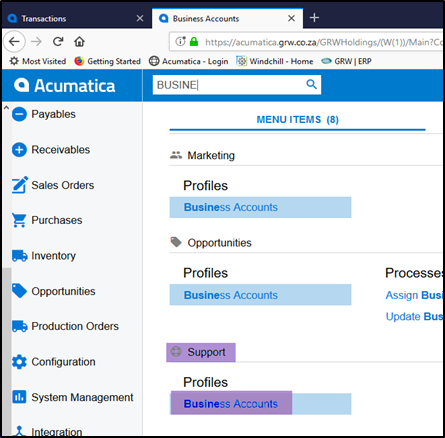
- Click in search and type in 'business'.
- Open business accounts under support>profiles.
- Click on the '+' to add a new one.
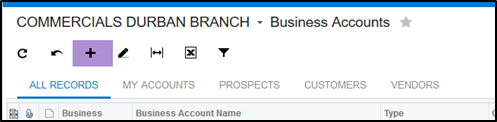
5. A new business account will default to open as a 'Prospect'.
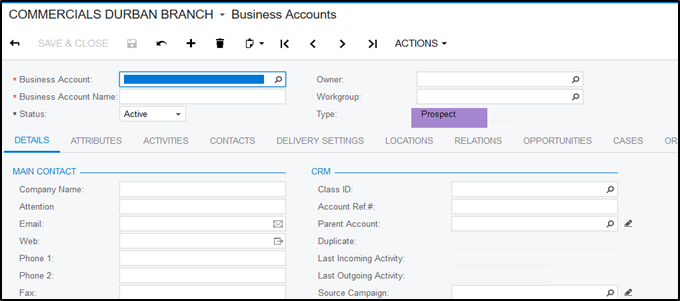
6. All Prospect's account code should start wil B-ABC.
(B-the first 3 letters of the name of the company, no numbers should be used)
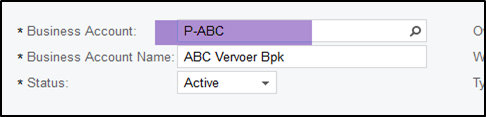
7. Please make sure that all details are completed and save your prospect.
8. Click on Actions and 'convert to customer/vendor' (Only specified people will have access to do this)
9. If you are a KAM and want your prospect converted to customer. Go to you opportunity select the Stage - "Request business account".
10. The system will send a notification to the debtors department via email.
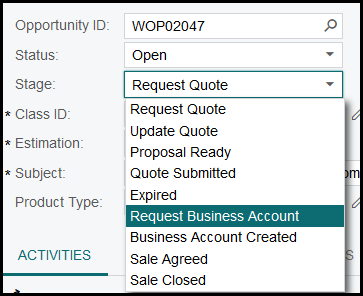
11. The debtors clerk will convert the prospect to a customer.
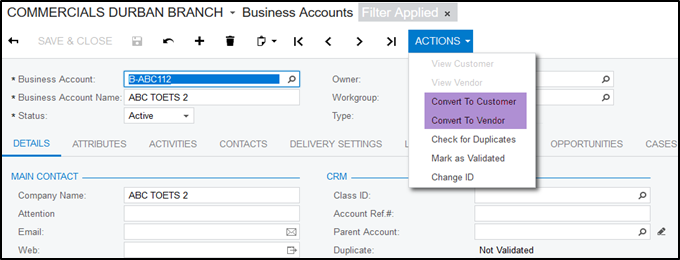
11. Once the debtors clerk created a business account they will mark the opportunity's stage as 'business account created'
12. This will send a notification back to the KAM.
13. The KAM can then proceed in creating a sales order.
Created with the Personal Edition of HelpNDoc: What is a Help Authoring tool?